
Shopify App Integration Checklist for Store Owners
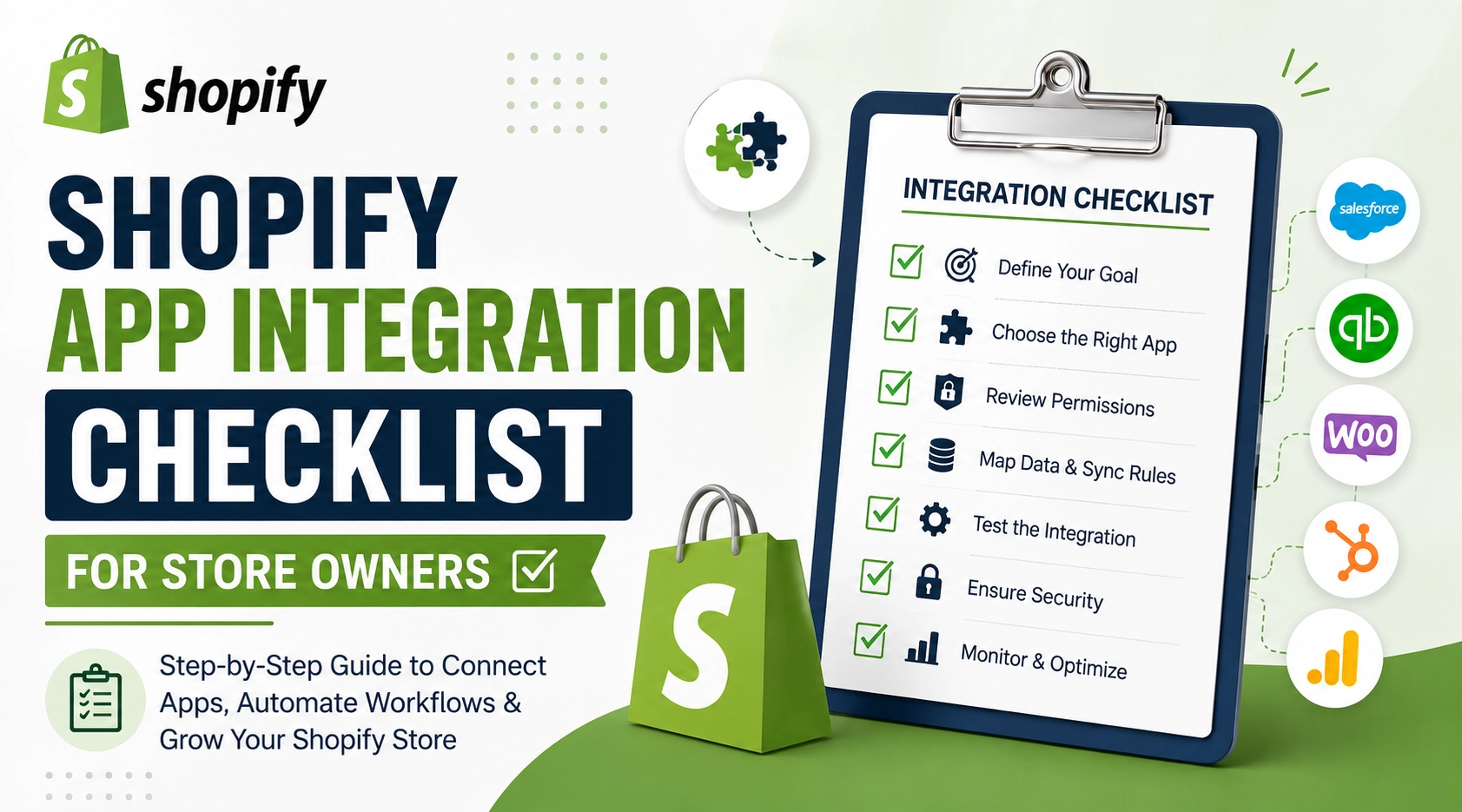
Shopify app integration connects your Shopify store with third-party apps, business software, or custom systems to automate workflows and exchange data. A proper integration can connect Shopify with CRM, ERP, accounting, inventory, shipping, marketing, payment, and other business tools while reducing manual work.
But adding an app is not the same as creating a successful integration. Store owners need to consider compatibility, permissions, data synchronization, security, performance, cost, and scalability before going live.
This Shopify app integration checklist explains what to check before, during, and after integrating an app with your Shopify store.
Quick Answer: What Should You Check Before Shopify App Integration?
Before integrating a Shopify app, check its compatibility, permissions, pricing, reviews, API requirements, data synchronization capabilities, security, performance impact, scalability, and support. You should also define which system is the source of truth, test the integration with real-world workflows, and establish a process for handling synchronization errors.
Shopify App Integration Checklist at a Glance
| Checkpoint | What to Verify |
|---|---|
| Ease of Use | What problem will the integration solve? |
| App compatibility | Does the app support your Shopify setup and requirements? |
| Permissions | What store data will the app access? |
| Data mapping | Which data needs to move between systems? |
| Data flow | Which system sends and receives information? |
| API compatibility | Are the required APIs and authentication methods available? |
| Security | Is customer and business data protected? |
| Performance | Could the integration affect store performance? |
| Testing | Have important workflows been tested? |
| Error handling | What happens when synchronization fails? |
| Cost | What are the app, development, and maintenance costs? |
| Scalability | Can the integration support future growth? |
| Monitoring | How will integration issues be detected? |
1. Define the Purpose of Your Shopify App Integration
The first step is to identify why you need the integration.
Instead of starting with an app, start with the business problem.
For example:
- Your team manually enters Shopify orders into an ERP.
- Customer information needs to be transferred to a CRM.
- Inventory needs to synchronize across multiple sales channels.
- Shipping information needs to be automatically sent to a fulfillment platform.
- Customer data needs to trigger marketing campaigns.
- Shopify needs to exchange information with custom business software.
A clearly defined objective makes it easier to determine whether you need a pre-built Shopify app, an app-to-app integration, or custom Shopify API integration.
2. Check Whether Shopify Already Supports the Requirement
Before installing a third-party app, determine whether Shopify’s existing features can handle your requirement.
Using unnecessary apps can increase your store’s technical complexity and ongoing costs.
Ask:
Can Shopify handle this requirement natively?
If yes, a separate app may not be necessary.
If not, compare available apps and determine whether an existing solution provides the functionality you need.
For highly specific workflows, custom integration may be a better option.
3. Choose the Right Shopify App
The most popular app is not necessarily the best app for your business.
Evaluate potential apps based on:
- Required features
- Shopify compatibility
- Reviews and ratings
- Developer reputation
- Update frequency
- Customer support
- Pricing
- Security practices
- Integration capabilities
- Scalability
Also check whether the app is actively maintained.
A Shopify store can depend heavily on its integrations, so choosing an app only because it is inexpensive can create problems later.
4. Review Shopify App Permissions
App permissions determine what information and store functionality an app can access.
Before approving an integration, review the requested permissions carefully.
Depending on the app, permissions may involve:
- Products
- Orders
- Customers
- Inventory
- Fulfillment
- Discounts
- Store data
Ask:
Does this app need all the permissions it is requesting?
A good Shopify integration follows the principle of giving applications only the access they actually require.
For custom integrations, permissions and access should also be reviewed during development and testing.
5. Identify Which Data Needs to Be Synchronized
One of the most important parts of Shopify app integration is data mapping.
Before development or installation, document exactly what information needs to move between Shopify and the external system.
For example:
Shopify → CRM
- Customer details
- Order history
- Customer tags
- Contact information
Shopify → ERP
- Products
- Orders
- Customers
- Inventory
- Fulfillment information
Shopify → Accounting Software
- Orders
- Payments
- Taxes
- Refunds
Shopify → Shipping Platform
- Order information
- Customer shipping details
- Product information
- Fulfillment status
Defining the required data prevents unnecessary synchronization and makes the integration easier to manage.
6. Define the Source of Truth
A common Shopify integration mistake is assuming that Shopify should be the source of truth for every type of data.
That is not always the best approach.
For example:
- Shopify may be the source of truth for online orders.
- An ERP may be the source of truth for inventory.
- A CRM may be the source of truth for customer relationship data.
- An accounting system may be the source of truth for financial records.
Before integration, decide:
Which system owns each type of data?
This prevents conflicting updates, duplicate records, and inaccurate information.
7. Define the Direction of Data Flow
Next, determine how data should move between systems.
One-way integration
Shopify → CRM
Customer information is transferred from Shopify to the CRM.
Two-way integration
Shopify ↔ ERP
Product, inventory, and order information can be exchanged between Shopify and the ERP.
You should define:
- Where data originates
- Where it is stored
- When it is synchronized
- Which system can update it
- What happens when conflicting information exists
Clear data-flow rules are essential for reliable Shopify integration.
8. Check Shopify API Compatibility
Advanced Shopify integrations may require APIs, webhooks, authentication, and other technical components.
Before development begins, verify:
- Required Shopify APIs
- API version compatibility
- Authentication requirements
- API limits
- Available data
- Webhook support
- Required permissions
- Third-party API compatibility
For a custom Shopify integration, developers should understand both Shopify’s requirements and the API requirements of the external system.
This is especially important when connecting Shopify to proprietary ERP, CRM, inventory, or business management software.
9. Check for App Conflicts
Installing multiple apps that modify the same part of your store can create conflicts.
For example, several apps might attempt to:
- Modify product information
- Manage inventory
- Apply discounts
- Add storefront scripts
- Track customer behavior
- Manage shipping
- Synchronize orders
Before installing another app, review your existing Shopify app stack.
Ask:
Do I already have an app performing this function?
Removing unnecessary or overlapping apps can simplify your store’s technology stack.
10. Consider Shopify Store Performance
Every additional integration should be evaluated for its potential impact on the storefront and overall technical environment.
Some apps may add scripts, tracking resources, requests, or other functionality.
Before installation, determine:
- What resources does the app load?
- Does it add storefront scripts?
- Does it run on every page?
- Can unnecessary scripts be limited?
- Is the integration required across the entire store?
After implementation, test important pages and user journeys.
Performance should be evaluated as part of the integration process rather than treated as an afterthought.
11. Test the Shopify Integration Before Launch
Never assume an integration works correctly just because the initial setup is complete.
Test the workflows that matter to your business.
For example:
- Create a new order
- Create a customer
- Update a product
- Change inventory
- Process a refund
- Cancel an order
- Fulfill an order
- Update shipping information
- Apply a discount
- Test payment-related workflows
Also test failure scenarios.
For example:
What happens if the external system is temporarily unavailable?
A reliable integration should have a defined way to identify and handle failed data transfers.
12. Create Error-Handling and Monitoring Processes
Integration problems can result in missing orders, incorrect inventory, duplicate customer records, or delayed updates.
Before launch, determine:
- How will failed synchronization be detected?
- Will failed requests be retried?
- Where will errors be logged?
- Who receives error notifications?
- How can failed records be corrected?
- How will duplicate data be handled?
For business-critical Shopify integrations, monitoring should continue after launch.
13. Protect Customer and Business Data
Security should be considered throughout the Shopify app integration process.
When selecting an app or developing a custom integration, evaluate:
- Access permissions
- Authentication
- API credentials
- Data transmission
- Webhook security
- User access
- Credential storage
- Third-party security practices
Do not provide unnecessary access to customer or store information.
You should also regularly review connected apps and remove integrations that are no longer required.
14. Calculate the Total Shopify App Integration Cost
The cost of Shopify app integration is not always limited to the app’s monthly subscription.
Your total cost may include:
App subscription + development + customization + maintenance + additional platform costs
Pricing can also depend on factors such as:
- Number of orders
- Number of customers
- Number of products
- API usage
- Number of connected systems
- Required custom functionality
For simple requirements, a pre-built Shopify app may be sufficient.
For complex workflows, custom Shopify integration may require an initial development investment but provide greater flexibility.
15. Plan for Scalability
Your integration should be able to support your future business growth.
An integration that works for a small store may become difficult to manage when order volume increases significantly.
Consider:
- Data volume
- API limitations
- Order volume
- Inventory locations
- Number of connected systems
- Future automation requirements
- Pricing at higher usage levels
Before choosing an integration, ask:
Will this solution still work when my Shopify store grows?
Planning for scalability can reduce the need to replace your integration later.
16. Document the Shopify App Integration
Once the integration is implemented, document how it works.
Your documentation should include:
- Connected applications
- Data being synchronized
- Data-flow rules
- API requirements
- Integration workflows
- Webhooks
- Error-handling procedures
- Important settings
- Support information
- Troubleshooting instructions
Good documentation makes future maintenance easier and reduces dependency on one developer or team member.
17. Monitor the Integration After Launch
Launching the integration is not the end of the process.
Monitor it regularly for:
- Failed synchronization
- Missing data
- Duplicate records
- API errors
- Delayed updates
- Inventory mismatches
- Order synchronization problems
Early detection is particularly important for integrations involving orders, inventory, payments, and fulfillment.
18. Review Your Shopify App Stack Regularly
Your business needs will change over time.
An app that was useful when your store was small may become unnecessary after your business grows.
Review your Shopify apps periodically and ask:
- Is the app still being used?
- Is it still solving a business problem?
- Are there duplicate apps?
- Has the pricing changed?
- Are the permissions still appropriate?
- Is the app actively maintained?
- Does it still integrate properly with our other systems?
Remove unnecessary apps and integrations to keep your Shopify environment easier to manage.
Shopify App Integration Checklist Before Going Live
Use this checklist before launching a new Shopify app integration:
Pre-Built Shopify App vs Custom Shopify Integration
| Factor | Pre-Built App | Custom Integration |
|---|---|---|
| Setup | Usually faster | Requires development |
| Cost | Often lower initially | Higher initial investment |
| Customization | Limited to available features | Highly customizable |
| Complex workflows | May be limited | Better suited |
| Maintenance | Usually handled by app provider | Requires ongoing management |
| Scalability | Depends on the app | Can be designed around business needs |
| Unique requirements | May not be suitable | Better option |
When should you choose a pre-built app?
A pre-built Shopify app is generally suitable when:
- Your requirements are standard.
- An established app already provides the required functionality.
- You want faster implementation.
- You do not require extensive customization.
When should you choose custom Shopify integration?
Custom integration may be more suitable when:
- Your business has unique workflows.
- Existing apps cannot meet your requirements.
- Shopify needs to connect with proprietary software.
- You need advanced API integration.
- Multiple business systems need to exchange data.
- You require custom automation.
- You need greater control over data and workflows.
Common Shopify App Integration Mistakes to Avoid
Store owners often focus on the app’s features and overlook the integration itself.
Avoid these common mistakes:
Installing too many apps
More apps do not necessarily mean more functionality. Multiple overlapping apps can increase complexity.
Ignoring data mapping
If you do not define which information should be synchronized, you may encounter missing or duplicate data.
Not defining a source of truth
Multiple systems modifying the same information without clear ownership can create conflicts.
Skipping testing
A workflow that works in one scenario may fail when an order is cancelled, refunded, edited, or partially fulfilled.
Ignoring scalability
An integration should be evaluated based on future business requirements, not only today’s order volume.
Forgetting ongoing maintenance
APIs, apps, business processes, and Shopify requirements can change. Integrations should be reviewed and maintained accordingly.
When Do You Need Shopify App Integration Services?
You may need professional Shopify app integration services when your store needs to connect with multiple business systems or requires workflows that cannot be handled effectively with standard apps.
Professional integration can help with:
- Shopify API integration
- Third-party app integration
- CRM integration
- ERP integration
- Inventory integration
- Accounting integration
- Shipping integration
- Marketing automation
- Custom business software integration
- Data synchronization
- Custom workflow automation
An experienced Shopify development team can first map your business requirements and then determine whether a pre-built solution or custom integration is the better approach.
Final Takeaway
A successful Shopify app integration is more than installing an application. It requires a clear understanding of your business workflow, data, connected systems, security requirements, performance considerations, and future growth.
Before integrating an app, define the objective, choose the right solution, map your data, establish the source of truth, test critical workflows, and create a plan for monitoring and maintenance.
For straightforward requirements, a pre-built Shopify app may be the fastest solution. For complex workflows or proprietary systems, custom Shopify integration can provide the flexibility needed to build a more scalable ecommerce technology stack.
If your Shopify store needs to connect with a CRM, ERP, inventory platform, accounting system, marketing tool, or custom business application, professional Shopify app integration can help create a reliable connection between your ecommerce store and the systems your business depends on.
Frequently Asked Questions About Shopify App Integration
1. What is Shopify app integration?
Shopify app integration connects a Shopify store with third-party applications or external business systems so they can exchange data and automate workflows.
2. What apps can be integrated with Shopify?
Shopify can be connected with many types of business applications, including CRM, ERP, accounting, inventory, shipping, marketing, analytics, customer support, payment, and custom software systems.
3. How do I integrate a third-party app with Shopify?
The process typically involves defining the business requirement, selecting an appropriate app, reviewing permissions, configuring the integration, mapping data, testing workflows, and monitoring the integration after launch. Complex integrations may require Shopify API development.
4. Is Shopify app integration expensive?
The cost depends on the app, number of systems being connected, data volume, customization requirements, API development, and ongoing maintenance. A simple pre-built app can cost less than a custom integration, while complex business workflows may require custom development.
5. Should I use a Shopify app or build a custom integration?
Use a pre-built app when an existing solution meets your requirements. Consider custom Shopify integration when you have unique workflows, proprietary software, complex data synchronization requirements, or functionality that existing apps cannot provide.
6. Can Shopify integrate with CRM and ERP systems?
Yes. Shopify can be integrated with CRM and ERP systems to synchronize information such as customers, orders, products, inventory, and fulfillment data. The exact integration approach depends on the systems involved and their available APIs.
7. Can Shopify app integrations automate business processes?
Yes. Integrations can automate workflows such as order synchronization, inventory updates, customer data transfer, shipping processes, accounting workflows, and marketing automation.
8. How can I prevent Shopify app integration problems?
Define your requirements and data flow before implementation, review app permissions, choose compatible solutions, test important workflows, establish error handling, monitor synchronization, and regularly review your connected apps.

About The Author
Rishika Pawar is a Digital Marketing Specialist at eWebWorld with expertise in SEO, content strategy, and AI-first search optimization. She researches emerging technologies and collaborates with software engineers, UI/UX designers, and app developers to create comprehensive, research-backed content on mobile app development, web technologies, and digital transformation. Her work focuses on delivering accurate, user-first information that aligns with Google’s EEAT guidelines and modern AI search experiences.
Search
Popular Posts


Follow us

Recent Posts



About eWebWorld
eWebWorld is a Shopify and eCommerce development company in India with 10+ years of experience building and scaling online stores. We specialize in Shopify development, including store setup, customizations, theme development, migrations, integrations, and performance optimization. Through our expertise in eCommerce, technology, and digital marketing, we help businesses create better online experiences and achieve sustainable growth.