How to Use Back-in-Stock Alerts During Halloween Sales
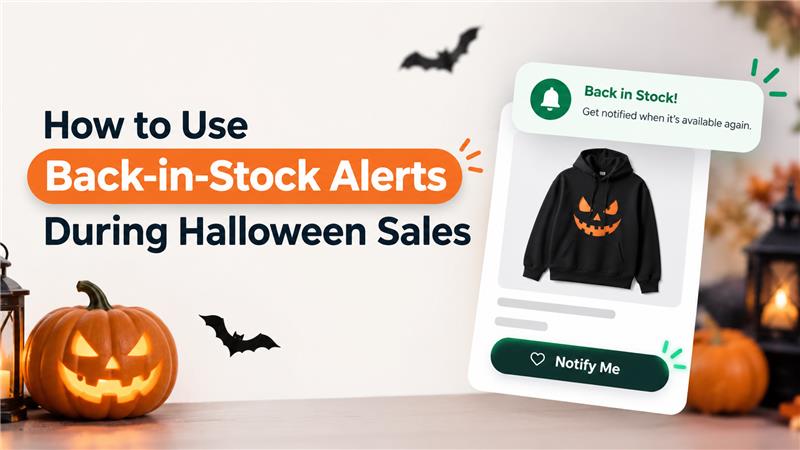
Halloween is a major opportunity for Shopify stores to attract shoppers with seasonal products, limited-time offers, and themed promotions. From Halloween costumes and decorations to beauty products and gift sets, customers often look for specific items to complete their Halloween shopping.
However, popular products can sell out before the sale ends. When this happens, customers may leave the store and purchase from a competitor instead.
This is where back-in-stock alerts can help Shopify merchants reconnect with interested shoppers when products become available again.
Instead of losing customers because an item is temporarily unavailable, merchants can notify shoppers when their favorite products return. With a well-planned alert strategy, Shopify stores can make better use of Halloween demand and create more opportunities to recover missed sales.
In this guide, we will explore how back-in-stock alerts work, why they matter during Halloween sales, and how to use them effectively in your Shopify store.
What Are Back-in-Stock Alerts?
Back-in-stock alerts are notifications that inform customers when a sold-out product becomes available again. Depending on the Shopify app and the store’s setup, customers may receive these notifications through email, WhatsApp, or other supported channels.
For example, imagine a customer visits your Shopify store looking for a Halloween pumpkin decoration. They like the product, but it is sold out. Without a way to receive updates, they may forget about the item or shop elsewhere.
With a back-in-stock alert, the customer can sign up to receive a notification when the decoration is available again.
Once the product is restocked, the store can send an alert that brings the shopper back to the product page.
This gives merchants another opportunity to convert existing product interest into a purchase.
The Role of Back-in-Stock Alerts in Halloween Sales
Halloween promotions often create concentrated demand for seasonal products. Since shoppers may want their purchases before October 31, timing becomes particularly important.
Here is how back-in-stock alerts can help.
1. Recover Sales From Sold-Out Products
Popular Halloween products can run out quickly during promotional periods. When customers encounter an unavailable item, they may abandon their shopping journey.
Back-in-stock alerts give interested customers a way to stay connected with the product. When inventory returns, a timely notification can encourage them to revisit the store and complete their purchase.
Example: A Halloween costume sells out shortly after a promotional campaign begins. Customers who signed up for restock notifications can be informed when the costume becomes available again.
2. Bring Interested Shoppers Back to Your Store
Not every customer purchases on their first visit. Some shoppers compare products, check prices, or wait until they are ready to buy.
When their preferred product is unavailable, they have another reason to leave.
A back-in-stock notification provides a relevant reason to return. Instead of sending another general promotional message, the store can notify customers about the specific product they wanted.
This makes the follow-up more useful and directly connected to their shopping interest.
3. Make Seasonal Inventory More Valuable
Halloween products have a limited selling window. Decorations, costumes, themed accessories, and seasonal gift items may have less demand after the holiday.
Restocking decisions therefore need to consider both customer interest and the time remaining before Halloween.
Back-in-stock sign-ups can help merchants identify which unavailable products shoppers still want. Combined with inventory levels and sales data, this information can support better restocking decisions.
However, sign-up volume should be treated as a demand signal rather than a guarantee of future sales.
4. Create More Relevant Customer Communication
Generic sale announcements reach customers with different interests. A back-in-stock alert, by contrast, responds to a specific product request.
For example, a customer waiting for a black Halloween dress does not necessarily need another message about pumpkin decorations.
A product-specific alert keeps communication relevant and gives customers a direct path back to the item they selected.
How to Use Back-in-Stock Alerts During Halloween Sales
To get the most out of back-in-stock alerts, Shopify merchants should plan how customers can subscribe, how notifications will be sent, and how restocked products will be promoted.
Step 1: Identify Products That May Sell Out
Start by reviewing the products you plan to promote during your Halloween campaign.
These might include:
- Halloween costumes and themed clothing
- Halloween decorations and lighting
- Seasonal beauty and makeup products
- Limited-edition gift boxes
- Halloween accessories and party supplies
- Popular products included in Halloween discounts
Use historical sales, current inventory, supplier lead times, and campaign plans to identify items that may need closer monitoring.
Prioritize products that combine strong customer interest with limited available inventory.
Step 2: Add a Back-in-Stock Sign-Up Option
When a product becomes unavailable, make it easy for shoppers to request a restock notification.
Instead of leaving customers with only a sold-out message, provide a clear option such as:
“Out of Stock? Get Notified When It’s Back!”
Depending on the app, shoppers may be able to enter their email address or phone number to receive a notification.
Keep the sign-up process simple. Explain what customers are signing up for and collect only the information required for the selected notification channel.
Make sure your store follows applicable privacy requirements and obtains the necessary consent before sending marketing messages.
Step 3: Choose the Right Notification Channel
The best notification channel depends on your audience, your app’s capabilities, and the communication preferences customers have provided.
Email alerts: Useful for sending product availability updates with a product image, product name, and link back to the store.
WhatsApp alerts: Can provide a direct, conversational way to notify customers who have opted in to receive messages through WhatsApp.
Other supported channels: Some apps provide additional notification options depending on the integration and configuration.
For example, an opted-in customer waiting for a Halloween gift set could receive an email when it is restocked. A customer who has opted into WhatsApp notifications might receive a short message with a link to the same product.
Choose the channel that fits your audience rather than sending duplicate notifications across every available channel.
Step 4: Send Alerts as Soon as Products Return
Timing is especially important during Halloween sales because customers may need their products before a specific date.
When inventory is replenished, configure your back-in-stock app to send notifications promptly, where supported.
A useful alert should include:
- The product name
- A clear message confirming availability
- A direct link to the product page
- A relevant call to action, such as “Shop Now”
For example:
Subject: Your Halloween Favorite Is Back!
Message: Good news! The Halloween decoration you were waiting for is available again. Visit our store to check availability and place your order.
CTA: Shop Now
Avoid promising that an item will remain available or arrive before Halloween unless your inventory and delivery estimates support that claim.
Step 5: Connect Alerts With Your Halloween Promotion
Back-in-stock alerts and Halloween discounts can work together, but the messaging should remain accurate.
Suppose a customer signed up for a sold-out Halloween costume while your store was running a seasonal sale. When the costume returns, you can notify the customer about its availability and mention an active discount if that product is genuinely eligible.
For example:
“It’s Back! Your Halloween Pick Is Available Again.”
“Your favorite costume has been restocked. Shop now while the Halloween offer is available.”
CTA: Shop the Restock
If the product is not included in the sale, do not imply that it is discounted. Likewise, do not advertise a limited-time offer unless its terms and expiry are clear.
Step 6: Make the Restocked Product Page Easy to Shop
A notification brings the customer back, but the product page still needs to support the purchase.
Review your product pages before the Halloween campaign begins.
Make sure they include:
- Clear product images and descriptions
- Accurate inventory availability
- Visible pricing and discount details
- Relevant size, color, or variant options
- Shipping information and estimated delivery dates
- A prominent purchase button
For products with multiple variants, confirm that the alert system can handle availability at the correct variant level if that functionality is supported.
A customer who receives an alert for a specific size or color should not be directed to a page where the desired option is still unavailable without a clear explanation.
Step 7: Monitor Alert Performance During the Campaign
Do not wait until Halloween is over to evaluate your results.
Monitor back-in-stock activity throughout the campaign to understand whether customers are signing up, returning to the store, and purchasing restocked products.
Useful metrics include:
Metric | What It Helps You Understand |
Alert sign-ups | How many shoppers requested product availability updates |
Notifications delivered | Whether alerts are reaching customers |
Click-through rate | How many recipients click through to the store |
Restock conversion rate | How many notified shoppers purchase after restocking |
Revenue from restocked products | Sales associated with restocked items and alert campaigns |
Time to sell out again | How quickly inventory moves after a restock |
Where possible, use your app’s analytics alongside Shopify order data and campaign tracking. Define a consistent attribution window before reporting revenue from alerts.
These metrics can help you identify which products attract the most interest and where your notification strategy may need improvement.
Best Practices for Back-in-Stock Alerts
A well-planned alert strategy should be helpful to shoppers without creating unnecessary messages.
Send Notifications Promptly
Customers sign up because they want to know when a product becomes available. Delayed notifications can reduce the usefulness of the alert, especially for seasonal products.
Keep Messages Short and Product-Specific
Tell customers which product is available and provide a direct link. Halloween-themed wording can make the message engaging, but the availability update should remain the main focus.
Avoid Overpromising Stock Availability
A restock does not mean inventory is unlimited. Use accurate availability information and avoid suggesting that every customer will be able to purchase the item.
Test Your Notification Setup Before Launch
Before your Halloween campaign starts, test the sign-up process, restock trigger, notification content, product link, and mobile experience.
Check that the system handles product variants correctly and does not send duplicate or inaccurate alerts.
Plan Restocks Around the Halloween Deadline
Consider supplier lead times, fulfillment capacity, and expected delivery dates before replenishing seasonal products.
As October 31 approaches, a product arriving back in stock may have less value to shoppers if it cannot reach them in time. Keep delivery information visible and avoid encouraging purchases that cannot reasonably be fulfilled before the holiday.
Respect Customer Preferences
Send notifications only through supported channels for which customers have provided the necessary consent. Follow applicable email and messaging rules, honor opt-outs, and avoid repeatedly contacting customers about the same product.
How eWeb Wishlist & Alerts Can Support Your Shopify Halloween Campaign
Managing product availability notifications manually can become difficult when multiple products sell out during a seasonal campaign.
eWeb Wishlist & Alerts is a Shopify app from eWebWorld that helps merchants give shoppers more ways to save products and reconnect with their favorite items.
Its relevant capabilities include back-in-stock notifications, wishlist functionality, and WhatsApp alerts, subject to the app’s available features and configuration.
During a Halloween campaign, merchants can use these capabilities to support the shopping journey in several ways:
- Back-in-stock alerts: Help customers learn when an unavailable product becomes available again.
- Wishlist functionality: Let shoppers save products they want to revisit.
- WhatsApp notifications: Reach opted-in customers through a familiar messaging channel when the relevant alert feature is configured.
- Wishlist analytics: Help merchants understand product-saving activity and customer interest through the app’s available reporting.
For example, a shopper may save a Halloween gift set to their wishlist. If the item sells out, a back-in-stock notification can provide a reason to return once inventory is replenished.
This approach helps Shopify merchants maintain a connection with interested shoppers even when their preferred products are temporarily unavailable.
Explore the app on the Shopify App Store.
Final Thoughts
Halloween sales create opportunities for Shopify stores, but popular products can sell out before every interested shopper has a chance to purchase.
Back-in-stock alerts give customers a convenient way to stay informed and help merchants reconnect with shoppers when products return. By identifying high-demand products, setting up notifications before the campaign, sending timely updates, and tracking conversions, stores can make their seasonal sales strategy more effective.
The key is to combine accurate inventory information with relevant customer communication and realistic delivery expectations.
With a thoughtful approach, back-in-stock alerts can become a useful part of your Halloween marketing strategy—not just for recovering missed purchases, but also for building a better shopping experience.
Frequently Asked Questions
1. What are back-in-stock alerts in Shopify?
Back-in-stock alerts notify customers when a previously unavailable product becomes available again. Depending on the app, notifications can be sent through email, WhatsApp, or other supported channels.
2. How can back-in-stock alerts help during Halloween sales?
They give customers a way to request updates about sold-out seasonal products. When those products return, timely notifications can bring interested shoppers back to the store and create additional purchase opportunities.
3. Can Shopify stores send back-in-stock alerts through WhatsApp?
Yes, Shopify merchants can use compatible apps that support WhatsApp availability notifications. The exact setup depends on the app, its integrations, and the required customer consent.
4. When should I send a back-in-stock notification?
Send it promptly after the relevant product or variant becomes available, provided your app supports timely automated alerts. Check that the inventory status is accurate before notifications are sent.
5. How do I measure the success of back-in-stock alerts?
Track sign-ups, successful deliveries, click-through rates, purchases following notifications, and associated revenue where attribution is available. Compare these results with your campaign objectives and inventory performance.
6. Can back-in-stock alerts help recover lost Halloween sales?
They can help recover some missed sales by reconnecting with customers who wanted products that were temporarily unavailable. Results depend on factors such as restocking speed, remaining seasonal demand, pricing, and delivery timelines.

About The Author
Akshita Dubey is an SEO Executive at eWebWorld with expertise in search intent analysis and content optimization. She focuses on creating user-centric content that simplifies complex technology topics, helping businesses and decision-makers understand web development, mobile apps, and digital solutions through clear, research-based insights.
Search
Popular Posts
Follow us

Recent Posts
About eWebWorld
eWebWorld is a Shopify and eCommerce development company in India with 10+ years of experience building and scaling online stores. We specialize in Shopify development, including store setup, customizations, theme development, migrations, integrations, and performance optimization. Through our expertise in eCommerce, technology, and digital marketing, we help businesses create better online experiences and achieve sustainable growth.