Halloween Sale 2026: Best Shopify Apps to Boost Your Store Sales
Halloween is more than a seasonal celebration for Shopify merchants. It is an opportunity to attract shoppers, promote seasonal products, increase average order value, and prepare for the upcoming holiday shopping season. In 2026, Halloween falls on Saturday, October 31, giving online stores a final opportunity to capture last-minute shoppers with attractive offers, themed product collections, and a smooth shopping experience.
However, running a successful Halloween sale involves more than adding a discount code to your Shopify store. Customers need to discover the right products, find relevant offers, trust your store, and complete their purchases without unnecessary friction.
The right Shopify apps can help simplify these tasks. From product search and wishlists to email marketing, product reviews, and promotional offers, these tools can help you make the most of your Halloween campaign. In this guide, we explore the best Shopify apps to boost your Halloween sales in 2026 and explain how to use them effectively.
Why Should Shopify Stores Prepare for Halloween Sales?
Halloween creates seasonal shopping opportunities for businesses selling costumes, decorations, beauty products, accessories, gifts, home decor, and other relevant products. A well-planned Halloween promotion can help Shopify merchants:
- Attract seasonal shoppers: Promote Halloween collections and limited-time deals to shoppers looking for relevant products.
- Improve product discovery: Help customers find products that match their needs and preferences.
- Increase average order value: Encourage customers to purchase complementary products or explore attractive bundles.
- Recover missed sales opportunities: Give interested shoppers a reason to return to products they previously considered.
- Build customer relationships: Use seasonal campaigns to encourage repeat purchases during Black Friday and the holiday season.
The key is to create a shopping experience that makes it easy for customers to discover, evaluate, and purchase products.
Best Shopify Apps to Boost Your Halloween Sales in 2026
1. Create a Dedicated Diwali Landing Page
When customers arrive at your Shopify store during Diwali, they should immediately understand what you are offering and where to find it. Instead of directing every festive campaign to your homepage, create a dedicated Diwali landing page featuring relevant products, offers, gift collections, and seasonal recommendations.
For example, a fashion store could showcase ethnic wear, festive accessories, and occasion-based outfits. A home décor store could highlight decorative lights, diyas, tableware, and gift sets. Your landing page should include:
- A clear headline, such as “Celebrate Diwali with Something Special.”
- Featured products and festive collections.
- Clearly explained discounts or bundle offers.
- Product prices and availability.
- Delivery estimates and return information.
- Prominent calls to action, such as “Shop Diwali Collection.”
Make the page easy to navigate on mobile devices, especially for customers arriving from Instagram, WhatsApp, or paid advertisements.
Practical tip: Link your Diwali landing page from your homepage banner, navigation menu, email campaigns, and social media posts. This creates a consistent path from promotion to purchase. If your store needs a more tailored festive shopping experience, explore Shopify development services to understand how store design and functionality can support your business goals.
2. Offer Meaningful Discounts and Festive Product Bundles
Discounts can attract attention during Diwali, but reducing every product’s price is not always the best approach. Heavy discounts can reduce profit margins without necessarily generating enough additional sales. Instead, create offers around what customers actually want to purchase. Consider these ideas:
- Festive bundles: Combine complementary products, such as an outfit with accessories or candles with home décor items.
- Gift sets: Create ready-to-buy hampers for family, friends, colleagues, or corporate gifting.
- Minimum-order offers: Provide an incentive when customers spend above a suitable order value.
- Limited-period deals: Promote selected products for a clearly defined period.
- Category-specific discounts: Offer deals on selected collections instead of discounting your entire catalogue.
For example, a skincare store could create a Diwali gift set containing a cleanser, moisturiser, and serum. Customers get a convenient gifting option, while the merchant has an opportunity to increase order value. Keep your offer simple. Explain which products qualify, how the offer works, and when it ends. Use countdown timers or scarcity messages only when they reflect a genuine deadline or actual stock limitations.
3. Improve Product Discovery With Search and Filters
Imagine a customer visiting your store to find a festive outfit within a particular budget. If they have to scroll through hundreds of products to find the right size, colour, or style, they may leave before making a purchase. This is why product discovery deserves attention during festive sales. Make it easier for shoppers to narrow down their choices with:
- Relevant search suggestions.
- Filters for price, size, colour, brand, and availability where applicable.
- Organised collections such as “Diwali Gifts,” “Festive Wear,” and “Home Décor.”
- Descriptive product titles and useful product information.
- Sorting options such as price and popularity.
Shopify merchants with larger catalogues can consider a dedicated Shopify search and filter app to improve how customers explore their products.
For example, eWeb Search & Filter helps Shopify merchants provide search and filtering functionality so shoppers can narrow their choices and find relevant products more easily. The objective is straightforward: reduce the effort customers need to find what they want. Monitor popular search terms, filter usage, product-page visits, and conversion rates to identify opportunities for improvement.
4. Use Wishlists to Bring Interested Shoppers Back
Not every visitor is ready to purchase on their first visit. Some customers compare prices, discuss gift ideas with family, wait for payday, or simply want more time to decide. A wishlist gives these shoppers a convenient way to save products for later. During Diwali, this can be particularly useful for customers comparing outfits, jewellery, electronics, home décor, or gifts. To make wishlists more effective:
- Add a visible wishlist button to relevant product pages.
- Make it easy for shoppers to save and revisit products.
- Enable wishlist sharing where supported.
- Offer relevant reminders or availability alerts where appropriate and permitted.
- Review wishlist activity to understand which products attract interest.
For example, a customer saves a festive saree but does not purchase it immediately. Later, they revisit their wishlist and decide to complete the order. Shopify merchants can explore eWeb Wishlist & Alerts, which supports wishlist engagement and customer notifications, including relevant WhatsApp alerts on supported plans. A wishlist does not guarantee a sale, but it gives interested shoppers a convenient reason to return rather than search for the same products again.
5. Plan Email and WhatsApp Campaigns Around Customer Behaviour
Email and WhatsApp can help you communicate with shoppers before, during, and after Diwali. The key is to send useful messages instead of repeatedly announcing that your sale is live. Start by grouping your audience into relevant segments, such as previous customers, new subscribers, shoppers who viewed products, and customers who saved items. Then tailor your communication to their interests.
| Campaign | What to communicate | Purpose |
|---|---|---|
| Festive announcement | Introduce your Diwali collection and upcoming offers. | Promote seasonal collections and festive deals. |
| Product recommendations | Highlight products related to customer interests or previous purchases. | Encourage relevant product discovery. |
| Cart reminder | Help eligible shoppers return to items left in their carts. | Recover abandoned carts and potential sales. |
| Wishlist reminder | Remind customers about products they saved, where appropriate. | Bring interested shoppers back to saved products. |
| Back-in-stock alert | Notify interested customers when a product becomes available again. | Recover sales opportunities for restocked products. |
| Post-purchase message | Share order updates, care instructions, or complementary products. | Improve customer experience and encourage repeat purchases. |
6. PageFly: Create a Dedicated Halloween Landing Page
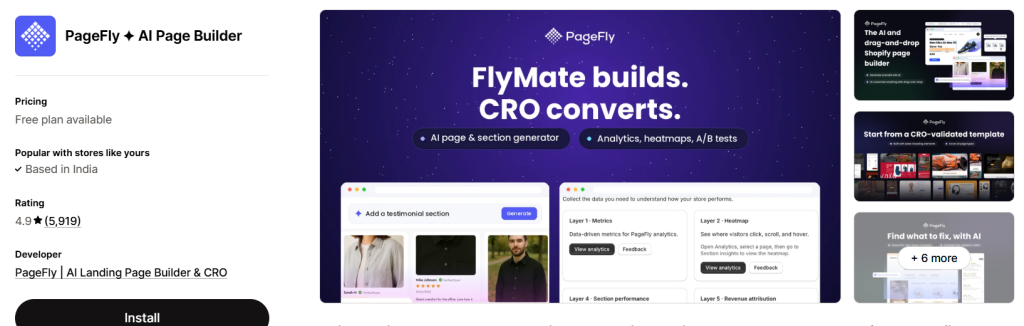
Best for: Building promotional pages and seasonal shopping experiences.
A dedicated Halloween landing page can bring your seasonal products, offers, and campaign messaging together in one place.
PageFly is a Shopify page builder that merchants can use to create custom landing pages and storefront layouts.
Instead of sending customers to a general homepage, you can direct campaign traffic to a page designed specifically for your Halloween promotion. A useful Halloween landing page could include:
- A clear Halloween sale headline.
- Your main promotional offer.
- Featured seasonal collections.
- Popular products and relevant bundles.
- Customer reviews or trust information.
- Clear calls to action leading to product pages.
For example, a beauty store could create a Halloween landing page featuring party makeup, themed beauty bundles, and selected products available at promotional prices.
Keep the page easy to navigate on mobile devices, and make sure the most important offer and shopping links are visible without unnecessary scrolling.
Why it matters for Halloween: A focused landing page gives visitors a clear starting point and helps them move from a promotional message to relevant products.
7. Shopify Email: Send Simple Seasonal Campaigns
Best for: Merchants who want to start with straightforward email marketing.
Not every store needs a complex marketing automation setup. Smaller Shopify businesses may prefer a simple way to announce promotions and communicate with existing subscribers.
Shopify Email can help merchants create and send marketing emails directly within the Shopify ecosystem, subject to the service’s current features and eligibility requirements. For Halloween, use it to share:
- Your Halloween sale announcement.
- Featured products and seasonal collections.
- Special offers and bundle deals.
- Last-minute shopping deadlines.
- Upcoming Black Friday promotions.
For example, an email titled “Your Halloween Shopping Starts Here” could introduce your seasonal collection and direct readers to the products most relevant to the campaign.
Avoid relying on a generic discount announcement alone. Include clear product links and explain why the offer may be useful to your audience.
Why it matters for Halloween: A straightforward email campaign can help communicate your offer without requiring an unnecessarily complicated marketing setup.
8. A Bundle or Upsell App: Increase the Value of Each Order
Best for: Encouraging complementary purchases and higher-value carts.
Alongside Halloween-specific products, many stores sell items that naturally complement one another. A suitable upsell or bundle app can help merchants present these products together. Depending on your catalog and campaign goals, you could use a bundle or upsell solution to promote:
- Complementary accessories.
- Matching products.
- Multi-item gift sets.
- Quantity-based discounts.
- Relevant add-ons at checkout or in the cart, where supported.
For example, a customer purchasing a Halloween outfit might also be interested in a matching accessory. Showing a relevant recommendation can make it easier to discover both products.
Choose a solution that fits your current Shopify setup, and avoid presenting too many offers that distract customers from completing their purchase.
Why it matters for Halloween: Relevant recommendations can help customers discover complementary items and may increase the value of individual orders.
Comparison: Which Shopify Apps Should You Choose for Halloween?
Different apps support different parts of the customer journey. Choose based on the problem you want to solve rather than installing every available tool.
| Shopify app or tool | Primary purpose | Halloween sales opportunity |
|---|---|---|
| eWeb – Wishlist & Alerts | Wishlist functionality and alerts | Encourage interested shoppers to return |
| eWeb – Search & Filter | Product discovery | Help shoppers find relevant products |
| Shopify Bundles | Product bundles and multipacks | Promote complementary products |
| Klaviyo | Email and SMS marketing | Communicate offers to relevant audiences |
| Judge.me | Product reviews | Help shoppers evaluate products |
| PageFly | Landing page creation | Build a focused Halloween campaign page |
| Shopify Email | Email campaigns | Announce seasonal promotions |
| Bundle or upsell app | Product recommendations and offers | Encourage complementary purchases |
App features, integrations, and pricing can change. Review each app’s current Shopify App Store listing before installing it.
How to Use Shopify Apps to Prepare for Halloween Sales
Installing apps is only one part of the process. You also need a clear campaign strategy that connects product discovery, promotional offers, and customer communication. Here is a practical checklist for the final days before Halloween.
Step 1: Create a Dedicated Halloween Collection
Group relevant products into a collection that shoppers can easily find from your homepage, navigation menu, and promotional campaigns. Use clear product names and descriptions, and ensure your collection includes products that are available and suitable for your intended delivery timelines.
Step 2: Set Up a Clear Promotional Offer
- A percentage discount on selected products.
- Buy-one-get-one offers.
- Discounts on product bundles.
- Free shipping above a minimum order value.
- A limited-time offer on selected seasonal products.
Step 3: Improve Product Discovery
Check that customers can navigate your Halloween collection easily. Relevant search and filtering options can help shoppers narrow down products without browsing your entire catalog. Test the shopping experience on mobile devices, especially if you plan to drive traffic from social media ads.
Step 4: Make It Easy to Revisit Products
Some customers may need more time before making a purchase. Wishlist functionality can help them keep track of products they are considering. Where appropriate, use relevant alerts and customer communications to encourage shoppers to revisit products they have shown interest in.
Step 5: Promote Your Sale Through Multiple Channels
Use your existing marketing channels to communicate the campaign. These might include email, social media, paid advertising, and your storefront announcement bar. Keep the message consistent across channels so shoppers understand the offer and know when it ends.
Step 6: Check Your Store's Performance
Before increasing traffic, test your key shopping journeys:
- Can visitors open the Halloween collection easily?
- Do search and filters return relevant products?
- Are product prices and discount terms clear?
- Do cart and checkout work correctly?
- Are shipping costs and delivery estimates easy to understand?
- Are analytics and conversion tracking configured correctly?
Fixing these issues can be more valuable than adding another app at the last minute.
Common Halloween Sale Mistakes Shopify Merchants Should Avoid
Even a well-designed promotion can underperform when the shopping experience creates unnecessary friction.
Installing too many apps: Every additional app can introduce costs, configuration requirements, or storefront performance considerations. Install only the tools that support a clear business objective.
Offering discounts without checking margins: Higher sales volume does not automatically mean higher profit. Calculate the cost of each offer before launching it.
Ignoring mobile shoppers: Check your banners, landing pages, product pages, and checkout experience on mobile devices.
Creating urgency without clear terms: If a sale ends on October 31, communicate the actual deadline. Avoid misleading countdown timers or false scarcity.
Forgetting delivery deadlines: Halloween products may lose their immediate relevance after October 31. Communicate realistic shipping estimates and cutoff dates, especially for customers ordering costumes, decorations, and gifts.
Ignoring the next shopping season: Halloween can also be an opportunity to build relationships with customers who may return for Black Friday and the holiday season.
Common Halloween Sale Mistakes Shopify Merchants Should Avoid
Halloween is a short seasonal shopping opportunity, but the customer relationships you build can continue beyond October. After the campaign, review which products attracted the most interest, which offers performed well, and where customers abandoned their shopping journeys. Use these insights to improve your next campaign.
For example, wishlist activity can provide insight into products customers are interested in, search data can reveal what shoppers are trying to find, and email campaign results can help you understand which messages generate engagement.
With this information, you can prepare more relevant promotions for Black Friday, Cyber Monday, and the holiday shopping season. The goal is not simply to generate more orders during Halloween. It is to build a shopping experience that helps customers discover products, make confident purchasing decisions, and return to your store when they need something else.
Final Thoughts
A successful Halloween sale depends on more than an attractive discount. Shopify merchants need to make products easy to discover, give shoppers compelling reasons to purchase, and provide a convenient path from browsing to checkout.
The right Shopify apps can support these goals by improving product discovery, encouraging customers to revisit products, building trust, and simplifying seasonal marketing campaigns.
If you are preparing your store for Halloween 2026, start by identifying the biggest barrier in your customer’s shopping journey. Then choose the tools that address that problem and measure their impact.
Explore eWeb – Wishlist & Alerts and eWeb – Search & Filter to discover ways to improve product engagement and product discovery in your Shopify store.
Make your Halloween campaign easier to shop, easier to navigate, and better prepared for the holiday sales season.
Frequently Asked Questions
1. What are the best Shopify apps for Halloween sales in 2026?
Useful options include eWeb – Wishlist & Alerts for wishlist functionality, eWeb – Search & Filter for product discovery, Shopify Bundles for product bundles, Klaviyo and Shopify Email for marketing campaigns, Judge.me for product reviews, and PageFly for landing pages. The best combination depends on your store’s catalog, budget, and marketing objectives.
2. How can I increase sales during a Shopify Halloween sale?
Create a dedicated Halloween collection, offer relevant discounts or bundles, improve product navigation, communicate your promotion through suitable marketing channels, and make checkout easy. Track conversion rate, average order value, and campaign revenue to evaluate results.
3. Can a Shopify wishlist app help increase Halloween sales?
A wishlist app can help shoppers save products they are considering and revisit them later. Depending on the app’s features and configuration, relevant alerts may also encourage customers to return when saved products become more attractive or available. Actual results depend on customer behavior and campaign execution.
4. How can I improve product discovery during a Halloween sale?
Organize products into relevant collections, use clear product descriptions, and provide useful search and filtering options. A search and filter app can help customers narrow their choices by attributes such as price, size, color, and brand, depending on the features supported by the app.
5. Should I install multiple Shopify apps before Halloween?
Not necessarily. Start with the main issues affecting your store. A store with a large catalog may benefit from better search and filtering, while a store focused on repeat engagement may prioritize email marketing or wishlist functionality. Test any new app carefully before relying on it during a major promotion.
6. What should Shopify merchants do after Halloween?
Review your campaign performance, manage remaining seasonal inventory, and transition relevant customers toward upcoming promotions. A post-Halloween clearance campaign may help sell suitable remaining stock, while customer engagement and email campaigns can support your Black Friday and holiday marketing plans.

About The Author
Rishika Pawar is a Digital Marketing Specialist at eWebWorld with expertise in SEO, content strategy, and AI-first search optimization. She researches emerging technologies and collaborates with software engineers, UI/UX designers, and app developers to create comprehensive, research-backed content on mobile app development, web technologies, and digital transformation. Her work focuses on delivering accurate, user-first information that aligns with Google’s EEAT guidelines and modern AI search experiences.
Search
Popular Posts
Follow us

Recent Posts

About eWebWorld
eWebWorld is a Shopify and eCommerce development company in India with 10+ years of experience building and scaling online stores. We specialize in Shopify development, including store setup, customizations, theme development, migrations, integrations, and performance optimization. Through our expertise in eCommerce, technology, and digital marketing, we help businesses create better online experiences and achieve sustainable growth.