How a Shopify Wishlist Can Help Bring Customers Back and Increase BFCM Sales
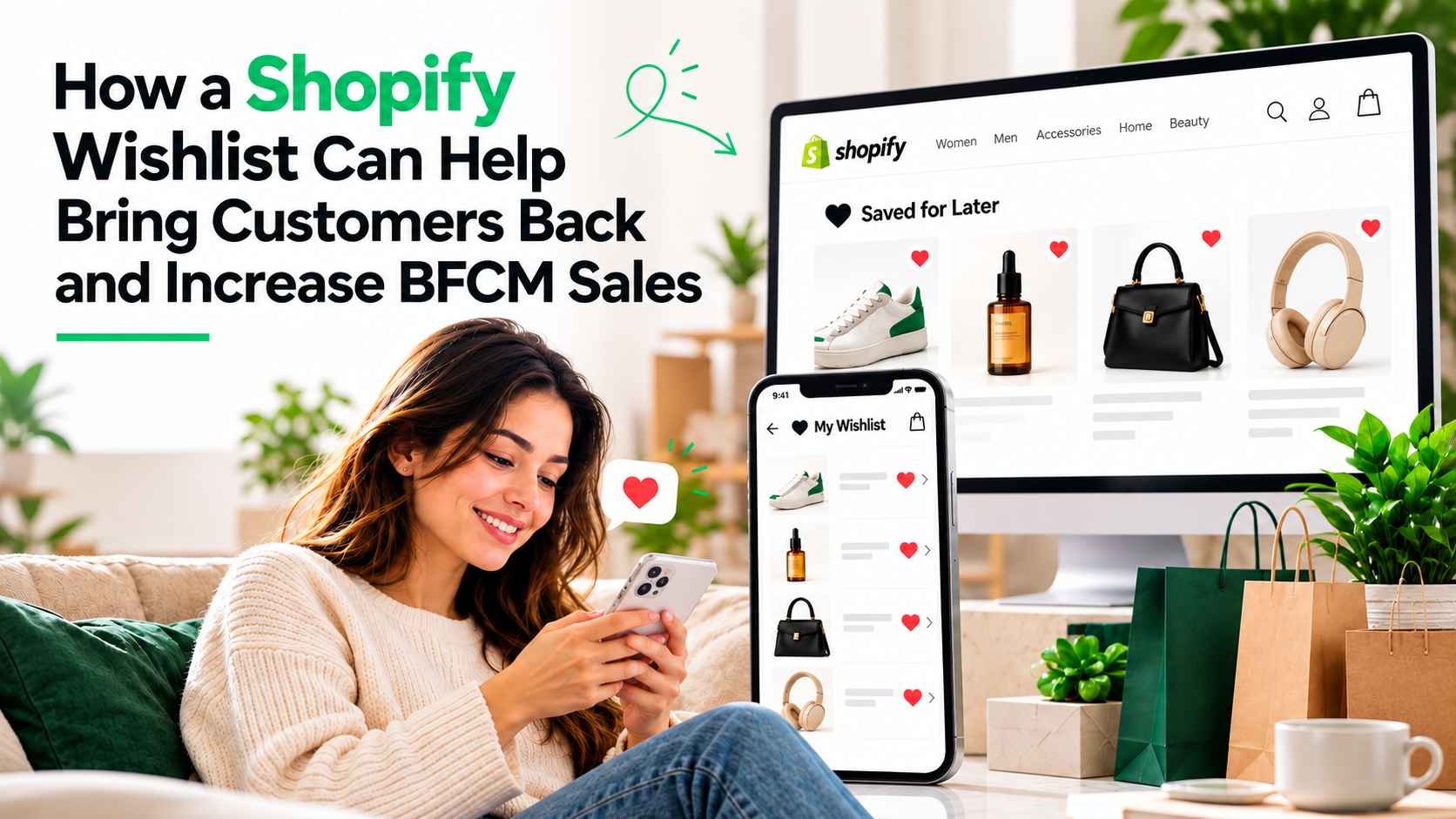
During BFCM, getting customers to visit your Shopify store is only half the battle. The bigger challenge is getting them to come back and complete a purchase.
A shopper may browse your products, click through multiple pages, and show clear interest in a product without buying it. They may be waiting for a better deal, comparing prices with another store, or simply planning to return later. But once they leave your store, how do you bring them back?
This is where a Shopify wishlist can become a powerful BFCM marketing tool. A wishlist is not just a place where customers save products. When combined with relevant notifications, it can help merchants re-engage shoppers based on products they have already shown interest in. During BFCM, that can mean turning previous product interest into another store visit — and potentially, another sale.
Why Bringing Customers Back Matters During BFCM
BFCM shoppers are not necessarily making purchasing decisions in a single session. They may visit your store several times before buying. They might:
- Browse products before the sale starts
- Compare prices across different stores
- Wait for a product to go on discount
- Check whether their preferred variant is available
- Add several products to their consideration list
- Leave and return later
The problem is that once they leave, merchants often have very few ways to reconnect with them around the specific products they were interested in. A generic BFCM email can reach thousands of customers, but it may not give every customer a reason to return. A wishlist changes that. It gives merchants a way to connect future notifications with actual customer interest.
A Wishlist Can Turn Customer Interest Into a Re-Engagement Opportunity
Imagine a shopper visits your Shopify store two weeks before BFCM. They find a pair of shoes they like but don’t purchase them. Instead, they add the shoes to their wishlist and leave. Then BFCM begins. The shoes are now 25% off. Instead of hoping the shopper remembers the product, the store can send a relevant notification informing them about the price change.
The journey becomes:
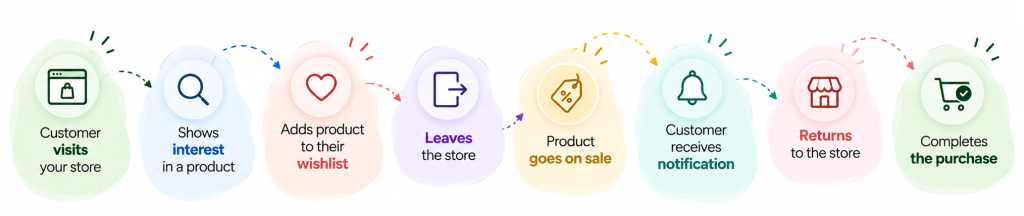
This is the real value of a wishlist during BFCM. It helps create a reason for an interested customer to come back at the right moment.
1. Bring Customers Back When Their Wishlisted Product Goes on Sale
Price is one of the biggest reasons BFCM shoppers wait before purchasing. A customer may already want a product but be waiting for the right price. If that product is on their wishlist, a price-drop notification can create a direct reason to return. For example:
Before BFCM:
Customer adds a jacket to their wishlist.
During BFCM:
The jacket gets a 30% discount.
Notification:
The customer receives an alert about the price drop.
Result:
The customer returns to the store and has a stronger reason to purchase.
This is much more relevant than sending the customer another general message saying that your BFCM sale is live. They are not being reminded about a random product. They are being notified about a product they already wanted.
2. Use Low-Stock Alerts to Create a Genuine Reason to Return
BFCM can create sudden demand for popular products. A product that had plenty of inventory before the sale can quickly become low in stock once the promotion begins. For a customer who has already wishlisted that product, this can be an important buying signal. For example:
The product you saved is almost out of stock. If the customer was already considering the purchase, knowing that inventory is running low may encourage them to return before the product becomes unavailable. This creates another re-engagement opportunity without relying on a generic promotional message. The key is to use real inventory information rather than creating artificial urgency.
3. Bring Customers Back When Products Are Back in Stock
Not every missed purchase happens because a customer changes their mind. Sometimes, the product they want simply becomes unavailable. A customer may visit during BFCM, select a particular size or variant, and discover that it is sold out. Without a way to reconnect with that shopper, the opportunity may be lost.
A back-in-stock alert can change that. The customer can wishlist the product and receive a notification when it becomes available again. This gives the merchant another opportunity to bring an already interested customer back to the store. For products with high demand, this can be particularly useful for:
- Fashion and apparel
- Beauty products
- Electronics
- Accessories
- Limited-edition products
- Seasonal products
4. Reach Customers Through Email and WhatsApp
The effectiveness of re-engagement also depends on how easily you can reach the customer. Wishlist-based notifications can work through channels such as email and WhatsApp, depending on the wishlist solution and the merchant’s setup. For example:
Email:
“Your wishlisted product is now 20% off.”
WhatsApp:
“The product you saved is running low in stock.”
These messages are connected to a customer’s previous activity. That makes them different from a broad promotional campaign. Instead of asking: “How can I get this customer interested?”
You are asking: “What happened to the product this customer already showed interest in?”That shift can make BFCM re-engagement much more relevant.
5. Re-Engage Customers Without Relying Only on Discounts
Discounts are a major part of BFCM, but not every customer needs another discount message. Sometimes the reason to return can be:
- A product is back in stock
- A preferred variant is available
- Inventory is running low
- A product has become more popular
- A wishlisted product has changed in price
This gives merchants multiple opportunities to reconnect with shoppers.
A wishlist therefore allows stores to build behavior-based re-engagement, instead of relying entirely on promotional campaigns.
6. Turn Pre-BFCM Interest Into BFCM Sales
One of the smartest ways to use a wishlist is to start before BFCM begins. Many shoppers research products before the actual sale. They may browse your store several days or weeks before Black Friday and save products they are interested in.
That creates a valuable opportunity.
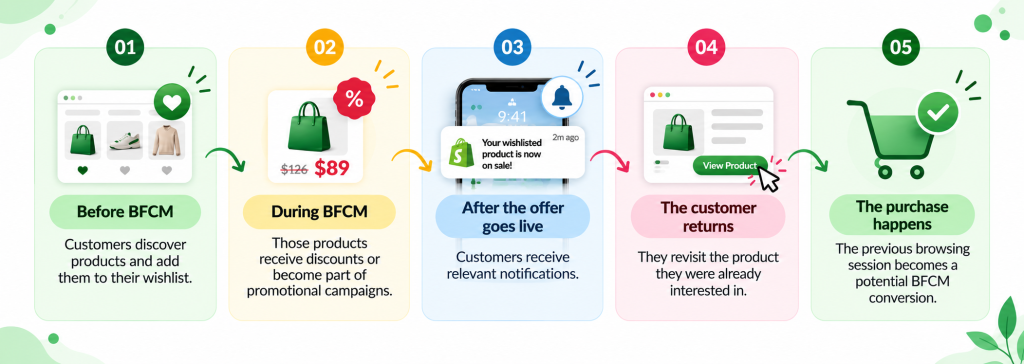
Instead of treating BFCM as a campaign that starts on Black Friday, merchants can use wishlist activity to build an audience of interested shoppers before the sale even begins.
7. Use Wishlist Data to Understand What Customers Want
A wishlist can also help merchants understand customer demand before deciding how to promote their products. Suppose you notice that one product is being added to wishlists much more frequently than others. That tells you something. Customers are showing interest in that product even before purchasing it.
Merchants can use this information alongside:
- Sales data
- Product views
- Conversion rates
- Inventory levels
- Traffic
- Customer behavior
This can help identify products that may deserve more attention during BFCM. For example, a product with high wishlist activity but relatively low sales may indicate that customers are interested but waiting for a better reason to buy. A BFCM offer could provide that reason.
8. Personalize the Reason for Coming Back
One of the biggest problems with BFCM marketing is message overload. Customers receive promotions from multiple brands at the same time. “Black Friday Sale Is Live” is easy to ignore. But a message connected to a product they already wanted can stand out more. Compare these two messages:
Generic:
“Our biggest BFCM sale is live. Shop now.”
Wishlist-based:
“The product on your wishlist is now 30% off.” The second message gives the customer a specific reason to return. That is what makes wishlist-based re-engagement valuable.
9. Recover Customers Who Were Close to Buying
Not every customer who leaves your store is a lost customer. Some are simply not ready yet. A wishlist allows merchants to maintain a connection with that interest. The customer has already done part of the journey:
Discovered the product → Considered it → Wishlisted it
Now the merchant can use relevant events to encourage the next step:
Price drop → Notification → Return → Purchase
This is especially important during BFCM because customers are actively making purchase decisions and looking for the best possible offer.
10. Keep Re-Engaging Customers Beyond Black Friday
The value of a wishlist does not disappear when BFCM ends. Some shoppers may not purchase during the sale. They may continue to have products saved after Cyber Monday. That creates future opportunities for re-engagement. For example:
- A product goes on sale again
- A product comes back in stock
- A new variant becomes available
- Inventory becomes limited
- Another relevant promotion starts
Instead of losing the customer after BFCM, merchants can continue engaging with shoppers around products they have already shown interest in.
How to Build a BFCM Wishlist Re-Engagement Strategy
A successful BFCM wishlist strategy does not need to be complicated.
Step 1: Make the wishlist easy to use
Allow customers to add products to their wishlist without unnecessary friction.Guest wishlist functionality can be especially useful for first-time shoppers who do not want to create an account before saving a product.
Step 2: Start collecting wishlist activity before BFCM
Do not wait until Black Friday.Promote your wishlist during the weeks leading up to BFCM and allow customers to build their product lists.
Step 3: Identify important wishlist events
Monitor what happens to wishlisted products. For example:
- Price drops
- Low stock
- Back in stock
These events can become reasons to reconnect with customers.
Step 4: Send relevant notifications
Use email, WhatsApp, or other available channels to notify customers when something meaningful happens to a product they have wishlisted.
Step 5: Make returning easy
Take customers directly to the relevant product or wishlist rather than making them search for the product again.
Step 6: Measure what happens next
Track whether wishlist activity leads to:
- Store visits
- Product views
- Add-to-cart actions
- Purchases
- Revenue
This helps merchants understand whether their wishlist is actually contributing to re-engagement and conversions.
What to Look for in a Shopify Wishlist App
If your goal is to use a wishlist as part of your BFCM marketing strategy, basic wishlist functionality may not be enough. Look for features that support customer re-engagement, such as:
- Guest wishlist
- Price-drop alerts
- Low-stock alerts
- Back-in-stock alerts
- Email notifications
- WhatsApp notifications
- Wishlist analytics
- Customer and product data
- Data export
- Wishlist sharing
- Custom notification templates
- Klaviyo integration
- Mailchimp integration
The more effectively your wishlist connects customer interest with relevant notifications, the more useful it becomes as a marketing channel.
How eWeb – Wishlist & Alerts Can Help Shopify Stores During BFCM
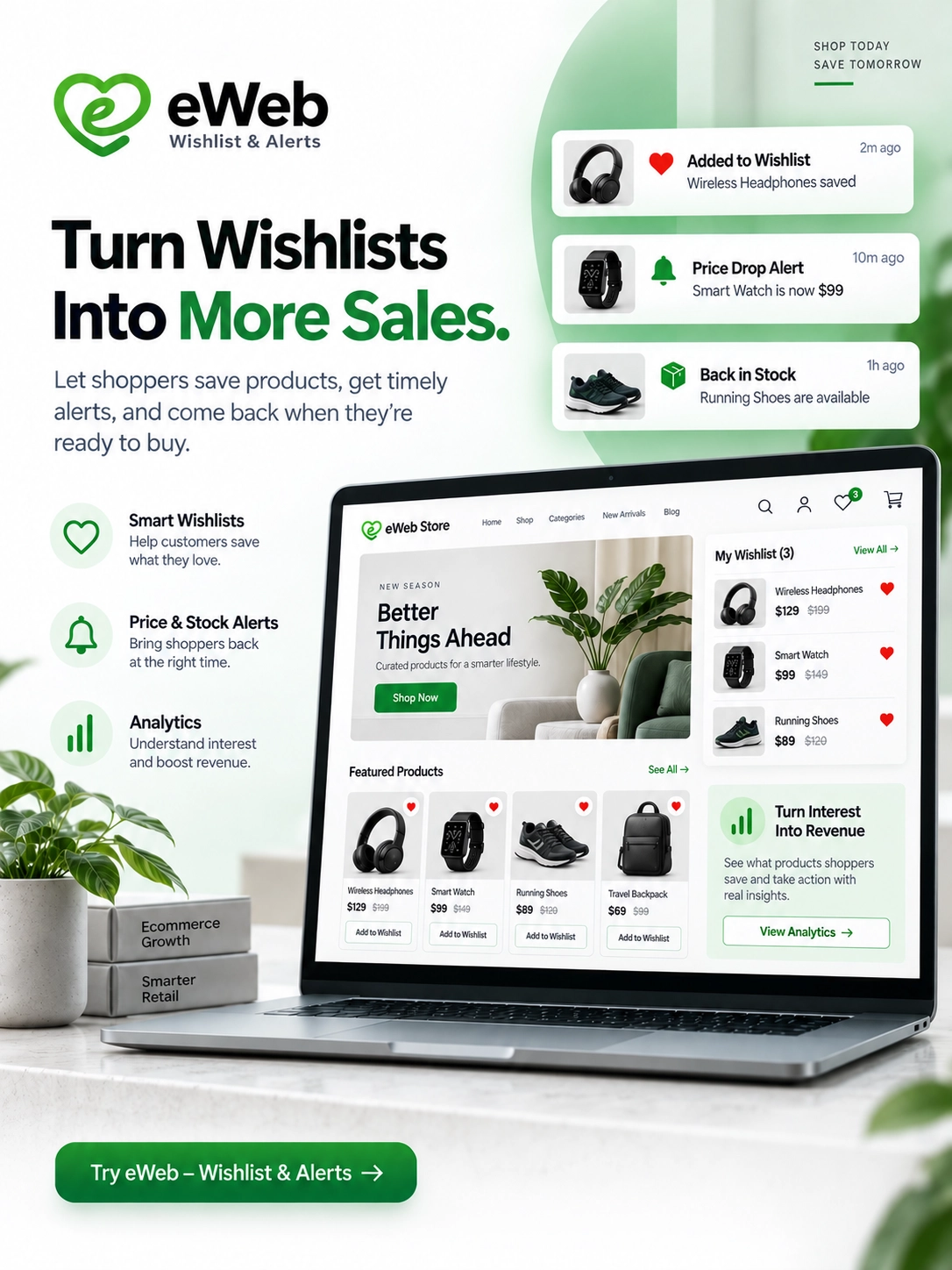
eWeb – Wishlist & Alerts is designed to help Shopify merchants turn wishlist activity into opportunities to reconnect with customers. Along with wishlist functionality, merchants can use features such as price-drop alerts, low-stock alerts, back-in-stock alerts, email notifications, WhatsApp alerts, wishlist analytics, data export, and customizable templates. The app also supports integrations such as Klaviyo and Mailchimp, allowing merchants to connect wishlist activity with their existing marketing workflows.
For BFCM, this can help create a simple customer re-engagement journey:
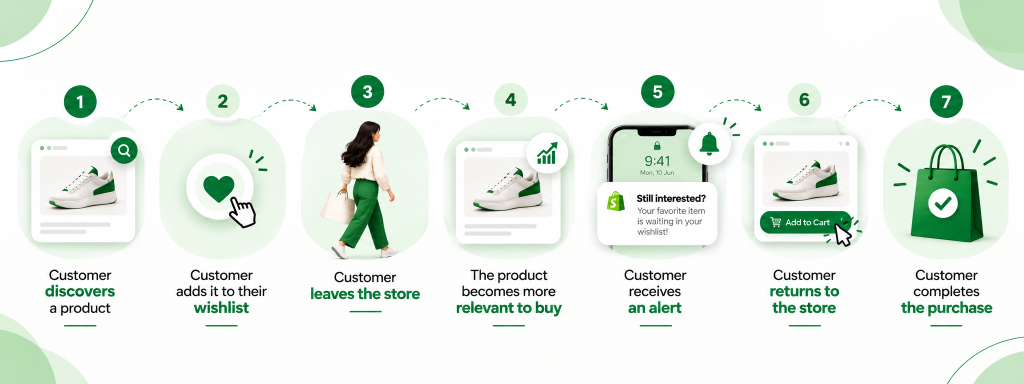
The wishlist is not the end of the customer journey. It can be the connection that brings the customer back.
Final Thoughts
BFCM is not only about attracting more shoppers. It is also about making the most of the shoppers who have already shown interest in your products. A customer who leaves your Shopify store without purchasing is not necessarily lost. If they have added a product to their wishlist, your store has a valuable signal: this customer is interested in this product.
When that product goes on sale, becomes low in stock, or comes back in stock, you have a relevant reason to reconnect. That is where a Shopify wishlist can become much more than a “save for later” feature. It can become part of your BFCM customer re-engagement strategy — helping you bring interested shoppers back to your store when they are most likely to make a purchase. Because during BFCM, sometimes the sale isn’t about getting a customer to visit your store for the first time. It’s about giving them a reason to come back.
People Also Ask
1. How can a Shopify wishlist help increase BFCM sales?
A Shopify wishlist allows customers to save products they are interested in but are not ready to purchase. During BFCM, merchants can use price-drop, back-in-stock, and low-stock alerts to encourage shoppers to revisit their store and complete their purchases.
2. Why is a wishlist important for Shopify stores during BFCM?
During BFCM, shoppers often browse multiple stores and compare prices before buying. A wishlist helps them keep track of products they want, while timely notifications give them a reason to return when a product becomes more affordable or available again.
3. Can a Shopify wishlist send price-drop notifications during BFCM?
Yes, Shopify wishlist apps with price-drop alert functionality can notify customers when a wishlisted product’s price decreases. This helps merchants inform interested shoppers about discounts and encourage them to return to the store during BFCM sales.
4. How do wishlist alerts help bring customers back to a Shopify store?
Wishlist alerts reconnect merchants with shoppers who have already shown interest in specific products. Email or WhatsApp notifications about price drops, back-in-stock updates, or low stock can remind customers about products they saved and encourage them to revisit the store.
5. Can customers use a Shopify wishlist without creating an account?
Yes, some Shopify wishlist apps support guest wishlists, allowing shoppers to save products without registering or logging in. This can make the shopping experience more convenient and help reduce friction for customers who are still exploring products before making a purchase.
6. What types of notifications are useful for Shopify stores during BFCM?
Price-drop alerts, back-in-stock notifications, and low-stock alerts can be particularly useful during BFCM. They help merchants share relevant product updates with interested shoppers instead of relying only on general promotional emails or storewide discount announcements.
7. Can Shopify wishlist apps send notifications through WhatsApp and email?
Yes, some Shopify wishlist apps support both email and WhatsApp notifications. Using these channels can help merchants reach customers through different communication preferences, provided the app supports the required integrations and customers have given the necessary consent.
8. How can merchants measure the impact of a wishlist during BFCM?
Merchants can evaluate wishlist additions, popular wishlisted products, alert engagement, returning visitors, and purchases associated with wishlist activity. Where tracking is available, these metrics can help identify customer interest and assess how effectively wishlist alerts contribute to BFCM sales.

About The Author
Rishika Pawar is a Digital Marketing Specialist at eWebWorld with expertise in SEO, content strategy, and AI-first search optimization. She researches emerging technologies and collaborates with software engineers, UI/UX designers, and app developers to create comprehensive, research-backed content on mobile app development, web technologies, and digital transformation. Her work focuses on delivering accurate, user-first information that aligns with Google’s EEAT guidelines and modern AI search experiences.
Search
Popular Posts
Follow us

Recent Posts
About eWebWorld
eWebWorld is a Shopify and eCommerce development company in India with 10+ years of experience building and scaling online stores. We specialize in Shopify development, including store setup, customizations, theme development, migrations, integrations, and performance optimization. Through our expertise in eCommerce, technology, and digital marketing, we help businesses create better online experiences and achieve sustainable growth.