
WordPress vs Webflow: Which Is Better for Your Business? (2026 Guide)
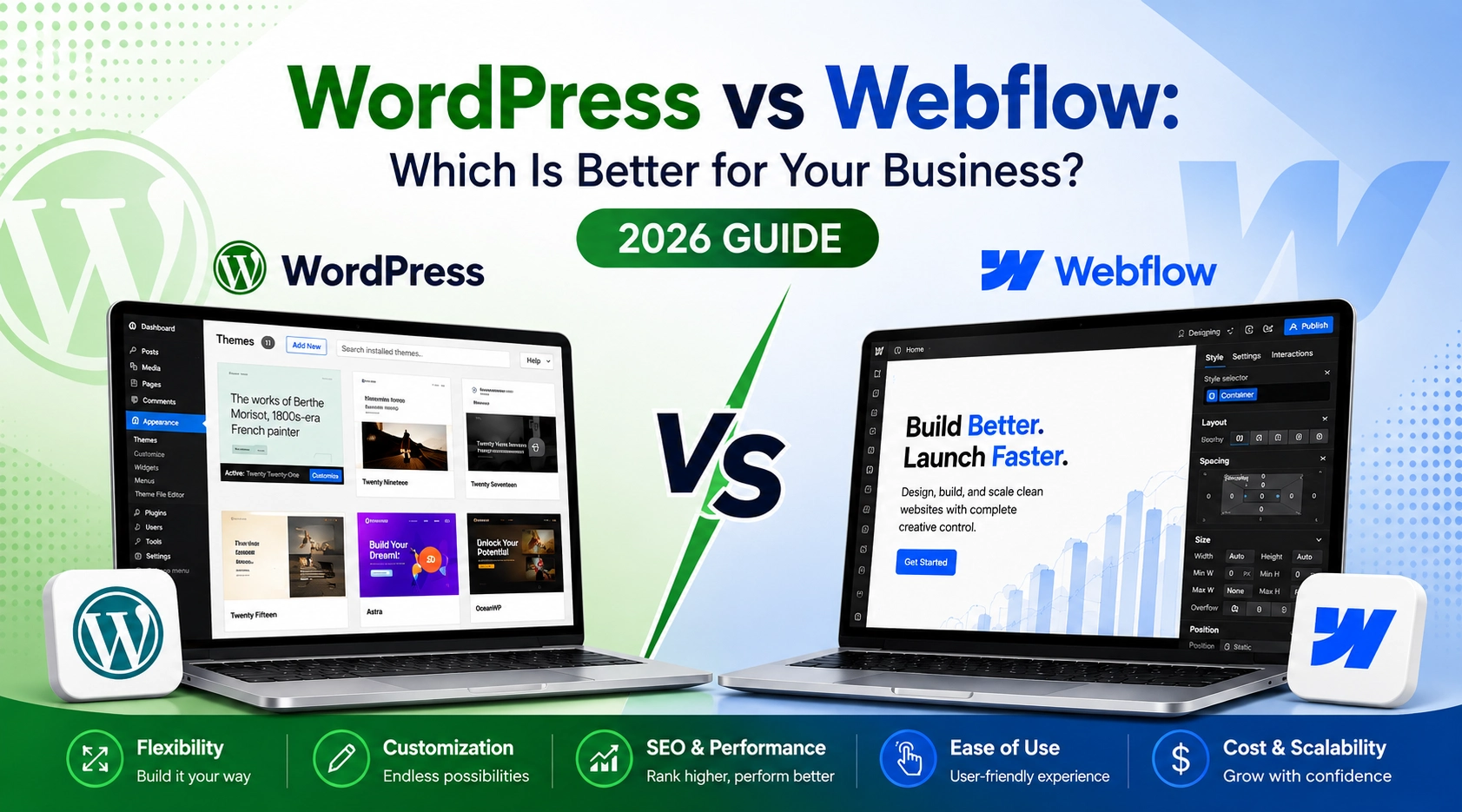
Choosing the right platform for your business website is one of the most important decisions you’ll make. Your website is often the first impression customers have of your brand, and the platform you choose affects everything from design flexibility and SEO to security, scalability, and long-term costs.
Two of the most popular website-building platforms today are WordPress and Webflow. While both can create beautiful, professional websites, they serve different types of businesses and users.
So, which one is better for your business in 2026?
In this detailed guide, we’ll compare WordPress and Webflow across every major factor to help you make the right decision.
What is WordPress?
WordPress is the world’s most popular Content Management System (CMS), powering over 40% of all websites on the internet.
It is an open-source platform, meaning anyone can use, modify, and customize it. Whether you need a simple business website, blog, eCommerce store, portfolio, or enterprise solution, WordPress offers endless possibilities.
With thousands of plugins and themes available, businesses can build almost anything without starting from scratch.
Key Advantages of WordPress
- Highly flexible and customizable
- Open-source with full website ownership
- Extensive library of themes and plugins
- Excellent SEO capabilities
- Ideal for blogs, business websites, and eCommerce stores
- Easily scalable as your business grows
- Large global community and support
- Supports advanced integrations and custom development
- Cost-effective with flexible hosting options
- Easy content management through a powerful CMS
What is Webflow?
Webflow is a modern visual website builder that combines website design, CMS, and hosting into one platform.
Instead of installing plugins or writing extensive code, users design websites visually while Webflow automatically generates clean HTML, CSS, and JavaScript.
Webflow is especially popular among designers and creative agencies because of its design freedom and built-in hosting.
Key Advantages of Webflow
- Visual drag-and-drop website builder
- Pixel-perfect design control
- Built-in hosting and SSL security
- Fast website performance with optimized code
- Automatic updates and maintenance
- Responsive design for all devices
- Clean, developer-friendly code output
- Built-in CMS for managing content
- Easy deployment without server management
- Ideal for modern business, portfolio, and marketing websites
WordPress vs Webflow: Quick Comparison
| Feature | WordPress | Webflow |
|---|---|---|
| Ease of Use | Requires some initial setup and learning but is easy to manage afterward | Intuitive visual editor with minimal technical setup |
| Design Flexibility | Highly customizable with themes, page builders, and custom code | Offers pixel-perfect visual design and built-in animations |
| Customization | Nearly unlimited through plugins, themes, and custom development | Customizable within the platform but has fewer third-party extensions |
| SEO | Advanced SEO control with plugins like Rank Math and Yoast SEO | Includes essential SEO tools with a straightforward setup |
| Content Management | Excellent for blogs, large content libraries, and multi-author websites | Best suited for smaller to medium-sized content-driven websites |
| eCommerce | WooCommerce supports complex online stores with extensive features | Ideal for smaller online stores with simpler requirements |
| Hosting | Choose your own hosting provider or use managed WordPress hosting | Hosting is included and managed by Webflow |
| Pricing | Flexible costs based on hosting, themes, and plugins | Subscription-based pricing that includes hosting and platform features |
| Security & Maintenance | Requires regular updates, backups, and security management | Security, updates, and infrastructure are managed automatically |
| Scalability | Suitable for websites of all sizes, from startups to enterprise-level platforms | Scales well for marketing websites and growing businesses but has limitations for highly complex projects |
1. Ease of Use
If you’re completely new to website building, Webflow offers a cleaner and more guided experience. Since hosting, updates, backups, and security are built into the platform, there’s less technical maintenance.
WordPress, on the other hand, has a slightly steeper learning curve. You’ll need to manage hosting, themes, plugins, and updates. However, once you’re familiar with it, WordPress becomes incredibly easy to manage.
2. Design Flexibility
Design is where Webflow truly shines.
It provides complete visual control over layouts, spacing, typography, animations, and interactions without writing code.
WordPress can also create stunning websites, but the design flexibility depends on your chosen theme or page builder like Elementor, Bricks Builder, or Gutenberg.
If your business needs unique animations and modern UI, Webflow has an advantage.
This is where both platforms shine.
3. SEO Capabilities
SEO is essential if you want customers to find your business online.
Both WordPress and Webflow support:
- Custom meta titles
- Meta descriptions
- Open Graph tags
- XML sitemaps
- Canonical URLs
- Image optimization
- Clean URLs
- Schema implementation
However, WordPress offers advanced SEO plugins like Rank Math and Yoast SEO, giving businesses more control over technical SEO.
Webflow handles many SEO basics automatically, making it beginner-friendly.
4. Blogging Experience
A well-designed blogging platform is essential for businesses that rely on content marketing to attract visitors, improve search rankings, and generate leads. Features like content organization, post scheduling, author management, categories, tags, and SEO tools make it easier to publish and manage content efficiently.
WordPress was originally built as a blogging platform, making it a strong choice for content-heavy websites. It offers advanced publishing features, supports multiple authors, provides content revisions, and integrates seamlessly with SEO plugins to help optimize every blog post.
Webflow includes a user-friendly CMS that allows businesses to create and manage blog content with ease. It works well for marketing websites and businesses that publish content occasionally. However, it offers fewer blogging and content management features compared to WordPress, especially for websites with large content libraries.
5. eCommerce
If your business plans to grow an online store, WordPress with WooCommerce is difficult to beat.
WooCommerce supports:
- Unlimited products
- Multiple payment gateways
- Subscription products
- Marketplace functionality
- Advanced shipping
- Thousands of extensions
Webflow Ecommerce works well for smaller catalogs but becomes limiting as stores grow.
6. Performance & Speed
Website speed affects user experience, conversions, and search rankings.
Webflow websites are optimized out of the box since hosting is tightly integrated.
WordPress performance depends on:
- Hosting provider
- Theme quality
- Plugin optimization
- Image optimization
- Caching
- CDN setup
A properly optimized WordPress website can be just as fast as Webflow.
7. Security
Webflow manages security for you.
SSL certificates, infrastructure updates, backups, and server maintenance are included.
With WordPress, security depends on proper hosting, plugin updates, backups, firewall configuration, and regular maintenance.
While WordPress requires more responsibility, it also offers greater control.
8. Pricing
WordPress Costs
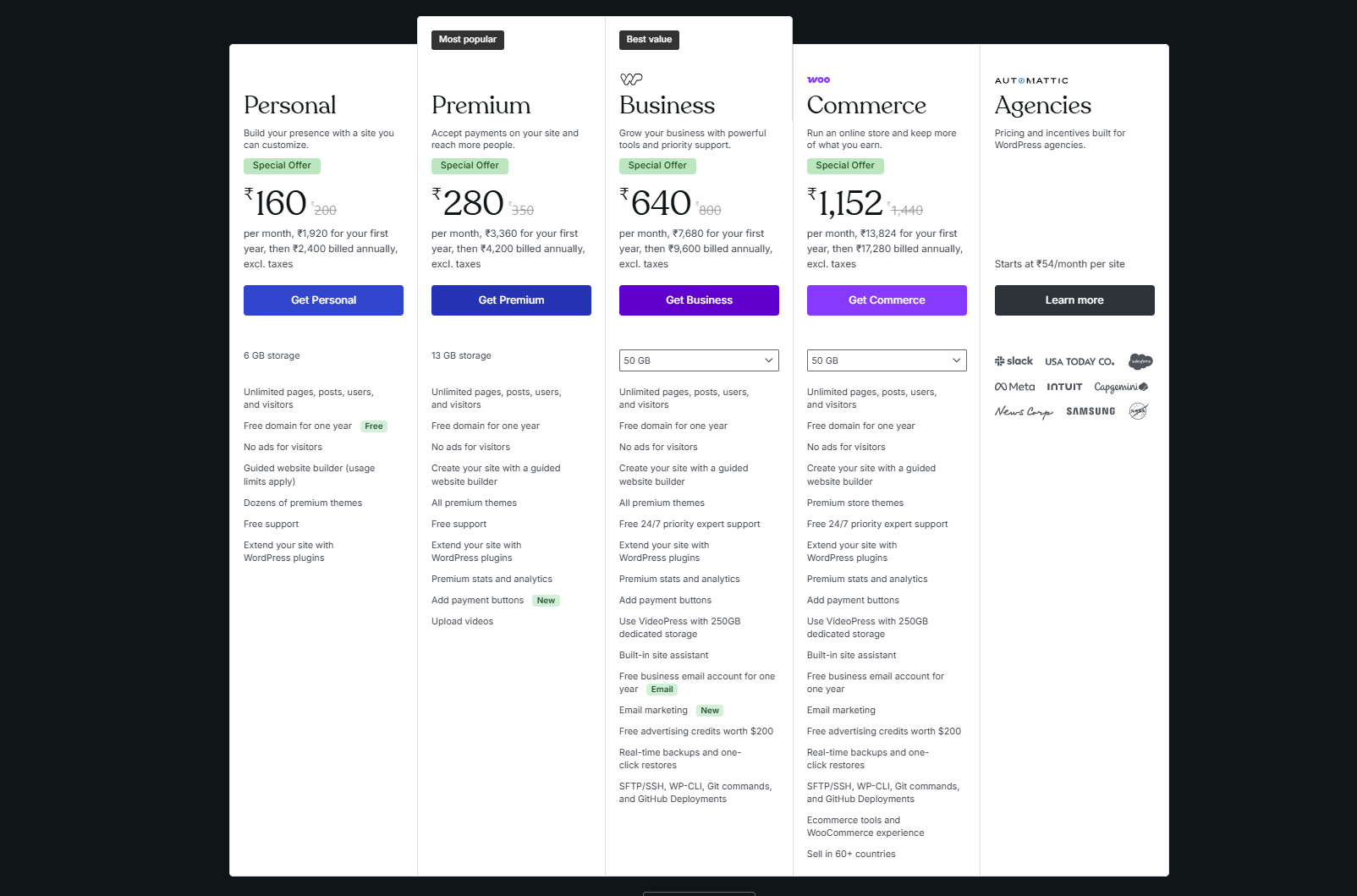
- Domain
- Hosting
- Premium theme (optional)
- Plugins (optional)
- Maintenance
The overall cost depends on your requirements and hosting provider.
Webflow Costs
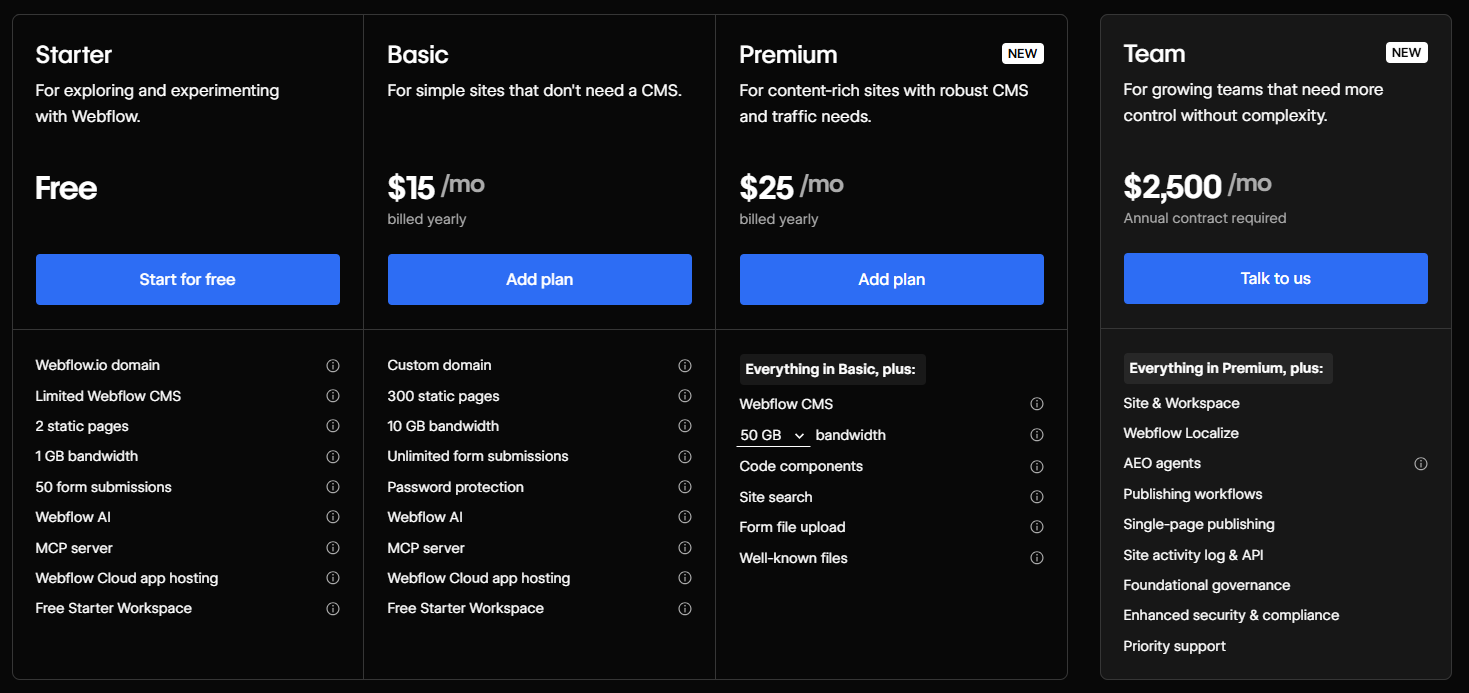
Webflow offers bundled pricing that includes:
- Hosting
- CMS
- Security
- Website builder
Although easier to manage, monthly costs can increase as your site grows or requires advanced features.
9. Scalability
Businesses rarely stay the same.
As your company grows, your website should grow with it.
WordPress supports:
- Thousands of pages
- Enterprise websites
- Membership platforms
- Large online stores
- Custom applications
- API integrations
Webflow scales well for marketing websites but may require workarounds for highly customized functionality.
10. Content Management
For businesses that publish blogs regularly, WordPress remains one of the strongest CMS platforms available.
Its editor, category management, user roles, scheduling, and plugin ecosystem make content publishing efficient.
Webflow CMS is clean and intuitive but is generally better suited for structured content and smaller publishing teams.
WordPress vs Webflow: Pros and Cons
WordPress Pros
- Open-source and highly flexible
- Thousands of plugins and themes
- Excellent SEO capabilities
- Powerful blogging features
- Great for eCommerce
- Large developer community
- Cost-effective over time
WordPress Cons
- Requires regular maintenance
- Plugin compatibility issues may occur
- Learning curve for beginners
Webflow Pros
- Modern visual editor
- Fast managed hosting
- Excellent performance
- Built-in security
- Professional animations
- Minimal maintenance
If you’re completely new to website building, Webflow offers a cleaner and more guided experience. Since hosting, updates, backups, and security are built into the platform, there’s less technical maintenance.
WordPress, on the other hand, has a slightly steeper learning curve. You’ll need to manage hosting, themes, plugins, and updates. However, once you’re familiar with it, WordPress becomes incredibly easy to manage.
Webflow Cons
- Higher ongoing costs
- Limited plugin ecosystem
- Less flexibility for advanced custom functionality
- Smaller community compared to WordPress
Which Platform Should You Choose?
Choose WordPress if you:
- Want complete ownership of your website
- Publish blogs regularly
- Need advanced SEO features
- Plan to build an online store
- Expect your website to grow over time
- Require custom functionality or integrations
Choose Webflow if you:
- Prioritize visual design and animations
- Prefer an all-in-one hosted solution
- Want minimal maintenance
- Need a marketing or portfolio website
- Have a design-focused team
Conclusion
Both WordPress and Webflow are excellent website platforms, but the right choice depends on your business goals.
If your priority is long-term flexibility, powerful SEO, content marketing, blogging, eCommerce, and scalability, WordPress is the stronger option. Its vast ecosystem of plugins, themes, and customization possibilities makes it ideal for businesses that expect to grow and evolve over time.
On the other hand, if you value modern visual design, built-in hosting, faster setup, and minimal maintenance, Webflow is an excellent choice for creating polished marketing websites and portfolios.
Ultimately, the best platform is the one that aligns with your business needs, budget, and future plans. Taking the time to evaluate your goals today can help you build a website that supports your success for years to come.
People Also Ask
1. Is WordPress better than Webflow for SEO?
Yes. WordPress provides greater control over technical SEO through plugins, custom settings, schema markup, redirects, and advanced optimization options, making it a stronger choice for businesses focused on organic search growth.
2. Is Webflow easier to use than WordPress?
For designing pages visually, Webflow is generally easier. However, WordPress offers more flexibility and a larger ecosystem, which can be advantageous as your website grows.
3. Which platform is better for blogging?
WordPress is the better choice for blogging. It was built as a publishing platform and includes advanced content management features that make publishing and organizing articles much easier.
4. Can Webflow build an eCommerce website?
Yes. Webflow includes eCommerce functionality, but it is better suited for small to medium-sized online stores. Businesses with complex product catalogs or advanced requirements often benefit more from WordPress with WooCommerce.
5. Which platform is more affordable?
WordPress typically offers greater pricing flexibility. You can choose hosting and only pay for the features you need, whereas Webflow follows a subscription model that may become more expensive as your site expands.

About The Author
Akshita Dubey is an SEO Executive at eWebWorld with expertise in search intent analysis and content optimization. She focuses on creating user-centric content that simplifies complex technology topics, helping businesses and decision-makers understand web development, mobile apps, and digital solutions through clear, research-based insights.
Search
Popular Posts



Follow us

Recent Posts

About eWebWorld
eWebWorld is a Shopify and eCommerce development company in India with 10+ years of experience building and scaling online stores. We specialize in Shopify development, including store setup, customizations, theme development, migrations, integrations, and performance optimization. Through our expertise in eCommerce, technology, and digital marketing, we help businesses create better online experiences and achieve sustainable growth.